AI chatbots can save law firms hours on intake, research, and knowledge search, but only if confidentiality, privilege, and accuracy are designed in from day one.
Quick answer: AI chatbots can help law firms with client intake, internal knowledge search, document summarization, and first-draft work. The main risks are leaking confidential client information, losing privilege, relying on fabricated citations, and accidentally creating an attorney-client relationship through a website chatbot. Most of these risks are manageable with the right tool choice, access controls, source-based answers, human review, and a clear firm policy. This guide covers all of them.
⚠️ Please note: This article is general information about technology, not legal advice. Professional conduct rules and court requirements differ by jurisdiction and change quickly. Check the rules that apply to you, and involve your firm's ethics counsel before deploying any AI tool.
Lawyers already use AI heavily. Thomson Reuters' 2026 AI in Professional Services Report found that legal research (80%), document review (74%), and document summarization (73%) are the most common uses among respondents. The same report found that most respondents' organizations use general-purpose AI tools (55%), which is where many of the confidentiality problems start.
The question for most firms is no longer whether to use AI. It is how to use it without putting client trust, privilege, or a license at risk.
What Is an AI Chatbot for a Law Firm?
An AI chatbot lets people ask questions in plain language and get written answers. In a law firm, it usually takes one of two forms:
Client-facing chatbots sit on the firm's website or client portal. They answer general questions, collect intake details, and book consultations.
Internal assistants are used by lawyers and staff. They search the firm's own documents, summarize files, and help draft first versions of work.
The safest internal assistants usually use Retrieval-Augmented Generation (RAG). RAG means the chatbot first searches an approved set of documents, then writes its answer from what it found, with links back to the sources. This is very different from asking a general-purpose chatbot a question and trusting whatever it says. Our RAG chatbot cost guide explains how RAG works in more detail.
What Are the Best Use Cases for AI Chatbots in Law Firms?
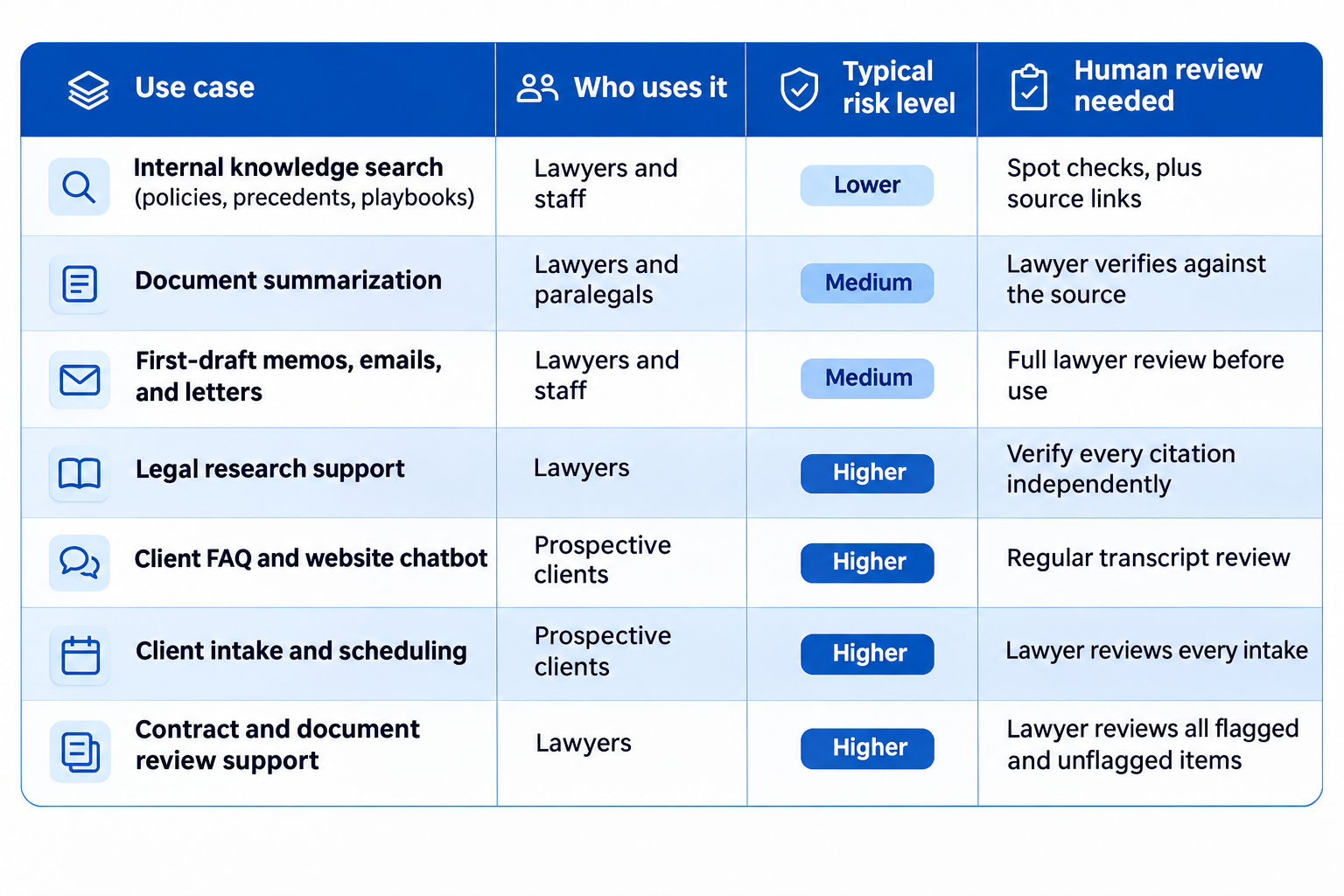
Not every use case carries the same risk. A sensible approach is to start with the lower-risk, internal ones and move outward as controls mature.
1. Internal knowledge search
Firms hold years of precedents, templates, checklists, and know-how that nobody can find quickly. A RAG assistant lets a lawyer ask, "What is our standard clause for this situation?" and get an answer with a link to the firm's own document.
Because it answers only from the firm's approved documents, it avoids many of the accuracy problems of a general chatbot. It is often the best first project.
2. Document summarization and review support
AI can summarize long contracts, depositions, and correspondence, and pull out dates, parties, and obligations. The lawyer still needs to check the summary against the original. A summary is a time-saver, not a substitute for reading the parts that matter.
3. Drafting support
Chatbots can produce first drafts of emails, memos, and routine letters. Treat these as drafts written by a very fast junior assistant: useful, but never ready to send without review.
4. Research support
AI can help find relevant material and explain concepts. It is also where the most serious public failures have happened, covered in the risks section below. Every case, quotation, and citation must be checked against a trusted source.
5. Client FAQ and intake
A website chatbot can answer common questions, such as office hours or practice areas, collect contact details, and schedule consultations outside office hours. This can help firms respond faster to people who would otherwise move on to the next firm. It also carries the most ethics risk, because members of the public are writing to it.
What Are the Biggest Risks of Using AI Chatbots in a Law Firm?
1. Leaking confidential client information
Lawyers have a duty to protect client information. Typing client details into a tool that stores them, reviews them, or uses them to improve its models can put that information in the wrong hands.
ABA Formal Opinion 512 (July 2024), the American Bar Association's guidance on generative AI, says lawyers need to understand how AI tools handle data. It also warns that tools that learn from user input may reveal information about one client's matter to other users. It encourages lawyers to read the terms of use and privacy policies of any tool before relying on it.
2. Losing privilege
Attorney-client privilege depends on confidentiality. In early 2026, in United States v. Heppner, a federal court in New York held that a defendant's conversations with a public, non-enterprise AI tool were not protected by attorney-client privilege or work product. The reasoning was that the tool is not a lawyer and that the provider's terms allowed it to review and share user data.
Some limits are important. The decision involved a public tool, and the chats were not made at a lawyer's direction. It is a single trial-level ruling, other courts may decide differently, and commentators note that closed, enterprise tools are a different situation. Still, it shows why the choice of tool and its terms matter, and why firms should also warn clients not to discuss their matters with public chatbots.
3. Fabricated citations and wrong answers
AI models can produce confident answers that are false, including cases that do not exist. In 2023, lawyers in Mata v. Avianca were sanctioned by a New York federal court for filing a brief with fake cases generated by ChatGPT. Courts have continued to sanction lawyers since then. One law-industry commentary reported at least $145,000 in publicly reported AI-citation sanctions in the first quarter of 2026 alone, and described a federal case where a lawyer was sanctioned for 15 fabricated citations and eight fabricated quotations.
The lesson is consistent: a lawyer is responsible for everything filed under their name, however it was produced. Some courts and judges also require disclosure of AI use in filings, and the rules vary.
4. Accidentally creating an attorney-client relationship
A website chatbot that sounds like a lawyer can lead a visitor to believe they have one. The Oregon State Bar's Formal Opinion 2026-208 on chatbots and AI agents addresses this directly. It says a chatbot that sounds like a lawyer could lead a visitor to reasonably believe an attorney-client relationship exists. It recommends clear disclaimers and prompt lawyer review of chatbot interactions to check whether a relationship formed and what duties followed.
The same opinion makes several other points that apply broadly:
A chatbot should not give legal advice, since that could amount to the unauthorized practice of law.
A chatbot must not be misleading, and should not overstate the lawyer's expertise or results. Some state bars have also said that a chatbot posing as a human may violate advertising rules.
Information from prospective clients is protected, even when no relationship forms.
Where an AI agent can act on its own, such as sending an engagement letter, a lawyer should approve the action.
Other states have their own rules, so check yours.
5. Weak supervision of vendors and staff
Under the professional conduct rules, lawyers must make reasonable efforts to make sure that non-lawyer assistants and outside vendors act consistently with the lawyer's duties. An AI chatbot, its vendor, and the vendor's own subcontractors all fall into this category. Staff who use unapproved tools on their own, sometimes called "shadow AI," create the same exposure without anyone noticing.
6. Access problems inside the firm
Law firms depend on ethical walls and matter-level confidentiality. An internal chatbot that can search every document for every user could expose a conflicted matter, or show HR or financial files to people who should not see them. Permissions must apply when the chatbot searches, not only when someone opens a file.
7. Billing and disclosure questions
ABA Opinion 512 also addresses fees and communication. Fees must stay reasonable and billing for AI-assisted work should be transparent, and lawyers should consider whether they must tell clients about AI use. Whether disclosure or consent is needed depends on the facts, so this is a question for your ethics counsel.
How Can a Law Firm Keep Client Data Safe When Using AI?
Treat AI tools like any other vendor that will touch client information, and then add a few controls specific to AI.
A practical checklist
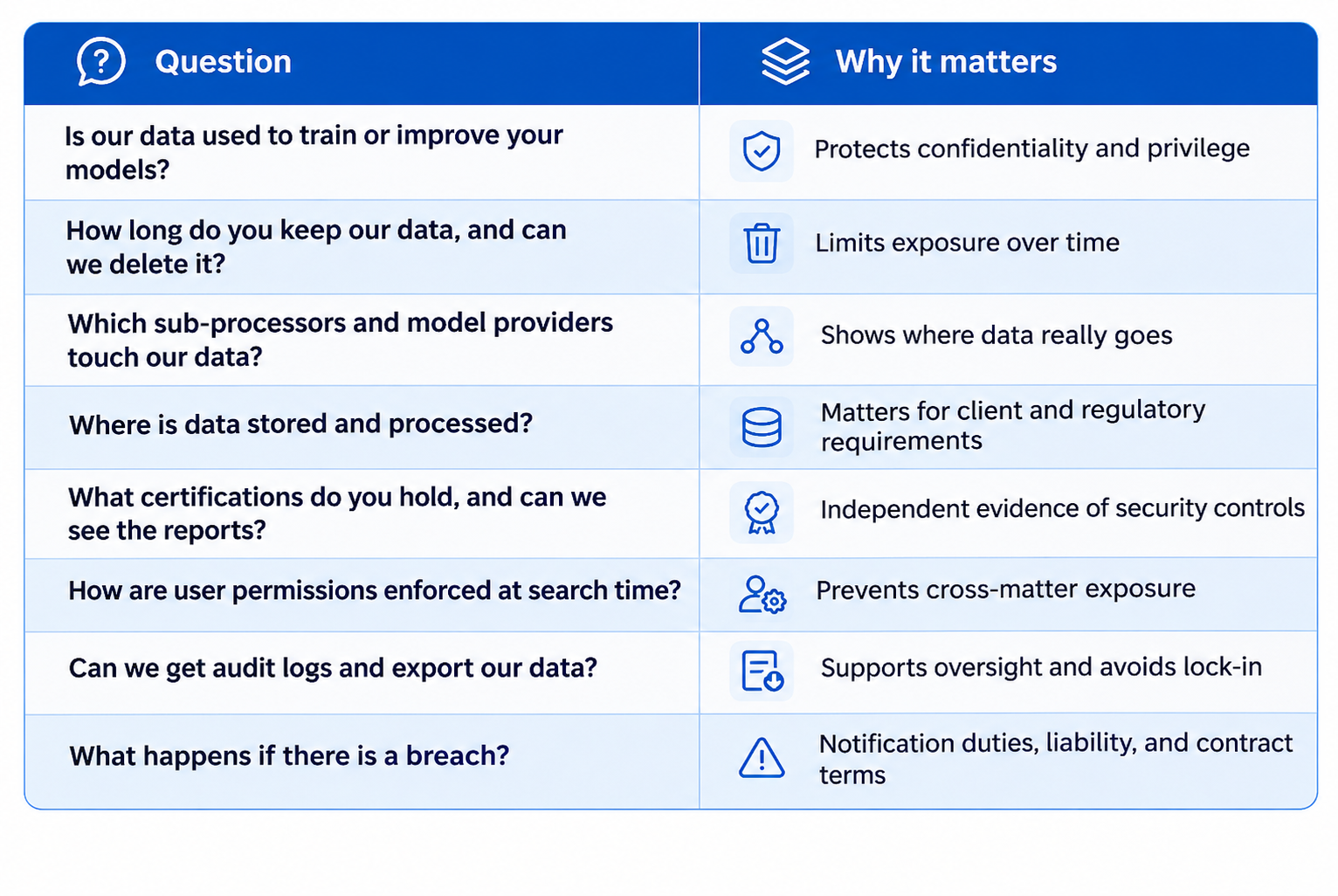
Choose enterprise or legal-specific tools, not free consumer chatbots. Consumer tools often have terms that allow review of conversations, and may use them for training.
Confirm that your data is not used to train the model. Get this in writing, in the contract, not only in marketing material.
Check retention and deletion. Know how long inputs and outputs are stored, who can see them, and how to delete them.
Ask for security certifications. SOC 2 Type II and ISO 27001 are common baselines, but a certificate is only a starting point. Ask for the report and read its scope.
Require encryption of data in transit and at rest.
Use strong access controls. This means single sign-on, multi-factor authentication, role-based access, and matter-level permissions, so users only retrieve what they are allowed to see.
Keep audit logs. You should be able to see who asked what, which documents were used, and what was answered.
Review the whole supply chain. Ask which sub-processors and underlying AI providers handle your data, and where.
Consider private or dedicated deployment for the most sensitive work, such as inside your own cloud account, so data stays in an environment you control.
Minimize the data you send. Do not include more client detail than a task needs, and redact names and identifiers where possible.
Write a firm AI policy. Define approved tools, banned uses, what may be entered, who reviews outputs, and how incidents are reported.
Train everyone. Lawyers, paralegals, and administrators should know the policy, the risks, and how to verify output.
Plan for incidents. Decide in advance what happens if confidential data is entered into the wrong tool.
What to ask any AI vendor
What Does a Safer Law Firm Chatbot Look Like?
The most reliable designs share a few features:
It answers only from approved sources. Instead of drawing on whatever a model remembers, it searches your own documents or a vetted legal database first.
It shows its sources. Every answer links back to the document and section it came from, so a lawyer can check it in seconds.
It says "I don't know." If the system cannot find enough support, it declines rather than guessing. This single behavior prevents many of the worst errors.
It enforces permissions. Retrieval respects matter-level access, ethical walls, and role-based rules.
It keeps a lawyer in the loop. Outputs are drafts. Actions that affect clients, such as sending letters, need approval.
It is tested and monitored. The firm measures accuracy against real questions, reviews transcripts, and re-tests when documents or models change.
For client-facing use, it is clearly labeled. It tells visitors they are talking to an AI, says it does not give legal advice or form an attorney-client relationship, and hands off to a person.
These are the same principles behind well-built RAG systems in any regulated field. Vyntics built an AI-powered compliance research assistant for a higher-education client that searches an approved collection of regulations, links every answer back to its sources, and states when it lacks enough evidence. You can read more in the Vyntics Compliance RAG Chatbot case study. That project is in a different field, but the approach carries over.
How Should a Law Firm Roll Out an AI Chatbot?
A phased rollout lets you learn what works before taking on the higher-risk uses.
Write the policy first. Decide what is allowed, who owns oversight, and how you will review outputs.
Pick one low-risk internal use case. Knowledge search over your own precedents is a common starting point.
Clean and organize the source documents. Remove duplicates and outdated versions. Poor documents lead to poor answers.
Run a small pilot with a few lawyers. Collect real questions, check the answers, and track errors.
Evaluate before you expand. Test whether the right documents are found, whether answers are supported by them, and whether the chatbot admits when it does not know.
Add higher-risk uses gradually. Client-facing chatbots and intake should come after the internal controls are working, and with ethics counsel involved.
Keep monitoring. Review logs and transcripts, update the policy, and re-test regularly.
If you are weighing where the chatbot's data should live, our comparison of PostgreSQL vs Pinecone for RAG covers the trade-offs, including how each handles permissions and security.
How Can Vyntics Help?
Every law firm has different practice areas, client expectations, and security requirements. Vyntics builds custom RAG systems and knowledge assistants, including document processing, search, source citations, evaluation, access controls, and deployment, designed around the way your firm handles information.
Explore our RAG & Knowledge Assistants service to learn more. You may also be interested in our AI Agents and Data Pipelines & Integration services.
Thinking about an AI assistant for your firm? Book a strategy call with Vyntics. We will talk through your use case, your documents, and your security requirements before any development begins. Your ethics counsel should be part of the conversation too.
Frequently Asked Questions
1.Can law firms use AI chatbots?
Yes. Bar associations, including the American Bar Association, have said lawyers may use generative AI, provided they meet their professional duties. These include competence, confidentiality, supervision, candor to the court, and reasonable fees. The details vary by jurisdiction.
2.Is it safe to put client information into ChatGPT or other public AI tools?
Generally not without careful review. Consumer tools may store conversations, allow staff at the provider to review them, or use them for training, depending on their terms. A 2026 federal ruling found that a client's chats with a public AI tool were not privileged. Many firms limit confidential data to approved enterprise or legal-specific tools with contractual protections.
3.Does using an AI chatbot waive attorney-client privilege?
It can, depending on the tool, its terms, and how it is used. Sharing privileged information with a third party that has no duty of confidentiality can risk waiver. Closed, enterprise tools with strict confidentiality terms are treated differently from public ones, but the law is still developing. Ask your ethics counsel.
4.Can a law firm website chatbot create an attorney-client relationship?
It can in some situations. If a chatbot leads a visitor to reasonably believe they are receiving legal advice from the firm, a relationship may arise. The Oregon State Bar has advised using clear disclaimers, avoiding legal advice, and having a lawyer review interactions promptly. Other states may differ.
5.Do I have to tell clients that I use AI?
It depends on the facts and your jurisdiction. ABA Opinion 512 says lawyers must consider whether they have a duty to disclose AI use, and that in some situations informed consent is required. Some courts also require disclosure in filings. Your ethics counsel can advise on your firm's approach.
6.How do I stop an AI chatbot from making up cases?
You cannot eliminate the risk, but you can reduce it. Use a system that answers from approved sources and shows its citations, make it decline when evidence is missing, and require a lawyer to verify every case and quotation against a trusted source before using it.
7.What is RAG, and why does it matter for law firms?
Retrieval-Augmented Generation (RAG) is an approach where the chatbot first searches a defined set of documents and then writes its answer from what it found, with source links. For law firms, this keeps answers tied to the firm's own materials and makes them easier to verify.
8.What security certifications should a legal AI vendor have?
SOC 2 Type II and ISO 27001 are common baselines. A certification shows that certain controls were independently reviewed, but it does not guarantee that a specific product meets your needs. Ask to see the report and check what it covers.
9.Should a law firm build a custom AI chatbot or buy one?
Off-the-shelf legal AI tools can be a good fit for common tasks and come with built-in security documentation. A custom build can make sense when you need your own documents, specific workflows, or tighter control over where data lives. Either way, run the same due diligence on security, data use, and permissions.
10.Who is responsible if the AI makes a mistake?
The lawyer. Professional conduct rules and courts hold lawyers responsible for the work they submit and for supervising the tools and people they use, however the work was produced.
Sources and Further Reading
ABA Formal Opinion 512 summary: JD Supra
Oregon State Bar Formal Opinion 2026-208: Chatbots and AI Agents
Husch Blackwell: United States v. Heppner and AI privilege
ComplexDiscovery via JD Supra: The AI Sanction Wave
Thomson Reuters 2026 AI in Professional Services Report, as covered by the New York Daily Record
Clio: How to use AI safely in your law firm
Some of these sources are commentary from law firms and vendors. Read the original opinions and rules that apply in your jurisdiction.
AI can give a law firm real time savings, but the firms that benefit most are the ones that treat it like any other tool touching client information. Start small, keep a lawyer in the loop, and build confidentiality and verification in from the start.