Running a RAG chatbot typically costs a few hundred to a few thousand dollars a month. See what drives the cost, real examples, and how to control your budget.
Quick answer: Running a RAG chatbot typically costs roughly $160 - $950 per month for a small deployment and $800 - $3,150 per month for a mid-sized one. That covers AI model usage, hosting, databases, storage, and monitoring. One-time development cost depends on your documents, integrations, and security needs, so it is best estimated after a requirements review. These are planning estimates, not quotations.
What is RAG?
Retrieval-Augmented Generation (RAG) is an approach where an AI chatbot first searches your own documents for the most relevant information, then uses it to write its answer. This lets the chatbot respond from your company's data, with sources, instead of relying only on what a language model learned in training.
Most of the ongoing expense of a RAG chatbot comes from a few predictable items: AI model usage, hosting, databases, storage, and monitoring. This guide breaks those down, explains what pushes a project's cost up or down, and shows how to keep your budget under control.
⚠️ Please note: The figures in this guide are rough planning estimates only. They are not actual costs and not Vyntics quotations.
What Does Each Project Level Include?
RAG projects generally fall into four levels based on scope. Each level needs a different amount of planning, development, and testing, so the cost is best estimated after reviewing your requirements.
Proof of concept
A proof of concept is a small version of the proposed chatbot. It helps a business check whether RAG can answer questions accurately using its own selected documents.
The scope is usually limited to one use case, a smaller document collection, and basic retrieval testing. It is a useful starting point before committing to a larger project.
Standard business RAG
This option suits businesses that want employees or customers to use the assistant regularly.
It generally includes document ingestion, search, citations, an application interface, and quality testing. Some integrations may also be included.
Enterprise RAG
Enterprise projects need more attention to security and reliability. They may include department-level permissions, audit trails, monitoring, document freshness checks, and higher availability requirements.
Complex custom platform
Some businesses need much more than a question-and-answer assistant. They may want several departments, multiple applications, and different workflows connected through one platform.
Projects like these require more planning, development, integration, and ongoing support.
When comparing proposals, look beyond the quoted price. Ask what is included for testing, deployment, documentation, security, and post-launch maintenance.
Planning a similar project? Talk to Vyntics about your requirements and get a scoped estimate before deciding on a budget.
What Drives the Cost of a RAG Chatbot?
Two projects with the same goal can receive very different quotes. The difference usually comes from a handful of factors:
Data volume and quality. A few hundred clean documents are far cheaper to process than tens of thousands of mixed files. Scanned pages, duplicates, and inconsistent formats all add preparation work.
Number of data sources and integrations. Each connected system, such as a document library, CRM, or ticketing tool, needs its own connection, authentication, and ongoing maintenance.
Security and access control. Role-based permissions, single sign-on, audit logs, and compliance requirements add design and testing effort.
Accuracy targets. The higher the required accuracy, the more time goes into search tuning, test question sets, and expert review.
How often your documents change. A static knowledge base is simple. One that changes daily needs automated refresh and approval workflows.
Deployment environment. A standard cloud setup costs less than a private cloud or on-premises deployment.
Users and scale. More simultaneous users and faster response times need more capable infrastructure.
When a quote looks unusually high or low, ask which of these factors it assumes. That is often where the gap comes from.
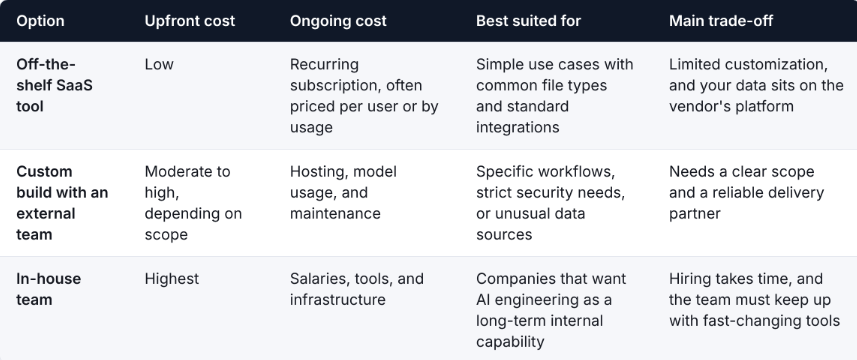
Build vs. Buy vs. In-House: Which Option Costs Less?
A custom-built RAG chatbot is not the only route. Many businesses compare three options before deciding.
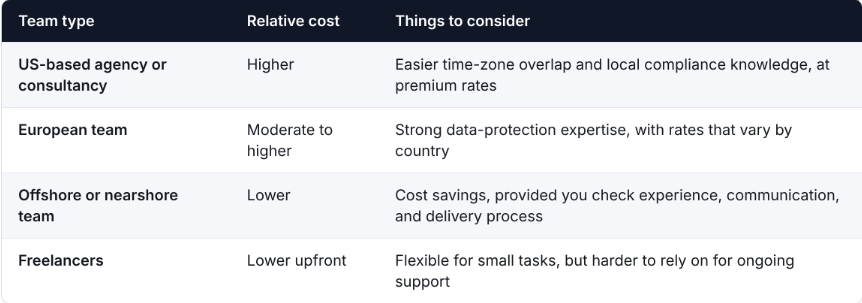
How Does RAG Chatbot Cost Vary by Region and Team Type?
Who builds the chatbot affects the price as much as what is built. Rates vary widely by country, experience level, and the type of team.
What Will a RAG Chatbot Cost to Run Every Month?
Development is an upfront investment, but the chatbot will continue to generate expenses after launch.
The main recurring infrastructure costs usually include AI model usage, hosting, database services, document storage, and monitoring. The amount depends on how many people use the system and how much information it processes. Ongoing maintenance and support are separate and depend on the agreement you have with your development team.
⚠️ Please note: The monthly figures below are rough planning estimates only. They are not actual costs and not Vyntics quotations.
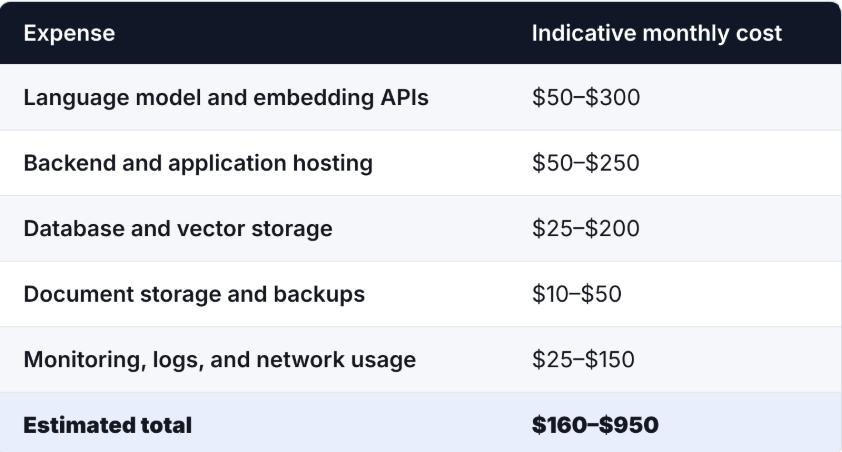
Example 1: A small business deployment
A small team might use a RAG chatbot to search company policies, product information, or internal documents.
A possible monthly budget could look like this:
Example 2: A mid-sized business deployment
Now consider a business where employees ask thousands of questions each month. The assistant searches internal policies, manuals, and other company documents.
Its monthly budget may be higher:
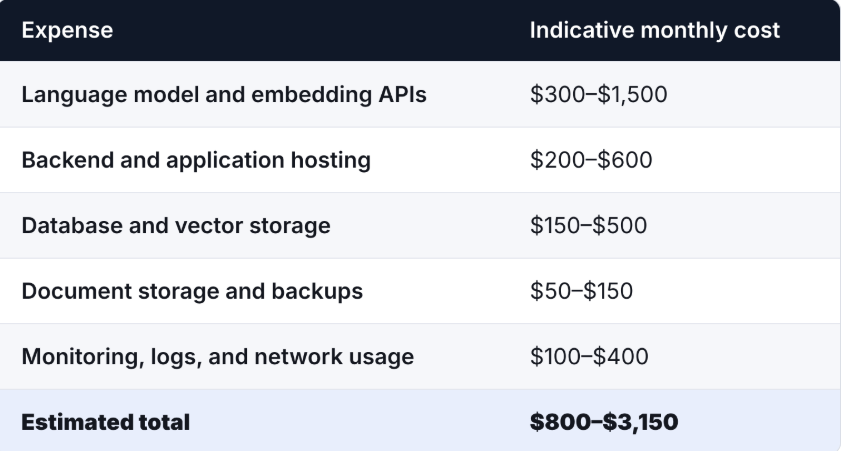
These examples are meant to help with early budgeting. They are not quotes from hosting or AI providers. Actual expenses will change with usage, infrastructure choices, and support requirements. The totals cover infrastructure and usage only. They do not include development or ongoing maintenance and support.
Why does the monthly bill change?
AI services often charge based on tokens. Tokens are small units of text processed by a model.
The system uses tokens when it sends a question and relevant document passages to the model. It also uses tokens when the model generates its response.
A simplified way to estimate the cost of one query is:
Query cost ≈ input token cost + output token cost + embedding cost + retrieval cost
The diagram below shows where each part of that cost comes from:
How a RAG chatbot query works: question, retrieval, document context, language model, answer with citations
For example, a query that sends 3,000 tokens of document context and generates a 400-token answer will cost a different amount depending on the model you choose.
Retrieving fewer, more relevant passages can help control usage. It also keeps unnecessary information from reaching the model.
A worked example: what 10,000 queries might cost
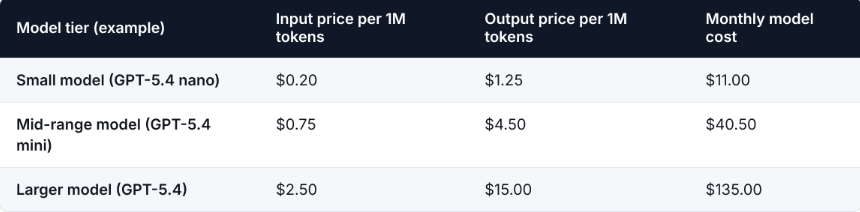
To make the formula concrete, suppose employees ask 10,000 questions in a month. Each question sends about 3,000 tokens to the language model (the question plus the retrieved document passages) and receives a 400-token answer. That adds up to 30 million input tokens and 4 million output tokens.
Here is what that volume would cost on three OpenAI models at their standard rates:
Embedding costs are small by comparison. At $0.02 per million tokens for OpenAI's text-embedding-3-small, embedding 10,000 short questions (about 50 tokens each) costs roughly one cent. Embedding a library of 1,000 documents at around 5,000 tokens each (5 million tokens) costs about ten cents, paid once.
⚠️ Please note: These prices are OpenAI's standard-tier rates as listed in November 2026 and are used only as an illustration. Other providers charge differently, and prices change often.
Real bills usually run higher than this simple calculation. Query rewriting, re-ranking, chat history carried across turns, retries, and evaluation runs all add tokens. That is why it is worth modeling your own usage instead of relying on a single formula.
Provider prices change, so check the latest rates before preparing a final estimate:
OpenAI API pricing
Supabase pricing
Pinecone pricing
What Additional Costs Should You Plan For?
Some expenses are easy to overlook when a project is first planned. They often become clear during development or after the chatbot goes live.
1. Cleaning documents and processing scanned files
Scanned PDFs need Optical Character Recognition (OCR). OCR converts text in an image into text that software can read.
The quality of the original file matters. Poor scans, handwritten notes, and complex tables may need extra processing and manual checks.
2. Keeping documents up to date
Company policies, contracts, product information, and regulations change over time.
The chatbot needs a reliable way to detect updated files and refresh its search index. This may involve scheduled processing, document comparisons, and approval steps.
Without this process, the chatbot may keep pulling information from an outdated document.
3. Protecting sensitive information
A business assistant should only show users the information they are authorized to access.
For example, an employee should not be able to retrieve confidential HR or finance documents without permission.
Setting up authentication, user roles, access rules, and audit logs takes additional work. These controls should be planned from the beginning.
4. Maintaining application integrations
External platforms sometimes update their APIs or authentication requirements.
When that happens, connected systems may need changes. Regular maintenance keeps these integrations working properly.
5. Testing answer quality over time
A chatbot's performance can change when documents, models, or search settings are updated.
Businesses should plan for regular testing, error reviews, and improvements. This is especially important when people rely on the assistant for important business decisions.
6. Cloud and data transfer expenses
Document uploads, scheduled processing, backups, logs, and network traffic can also add to the bill.
These expenses are worth reviewing regularly, especially as the document collection grows.
Businesses that want to manage infrastructure spending can also explore Vyntics Cloud Cost Optimization.
How Can You Check Whether a RAG Chatbot Is Giving Reliable Answers?
A RAG chatbot needs to be tested for both search quality and answer quality.
A response may sound convincing while being based on an irrelevant document. That is why checking only the final text is not enough.
Metrics worth checking
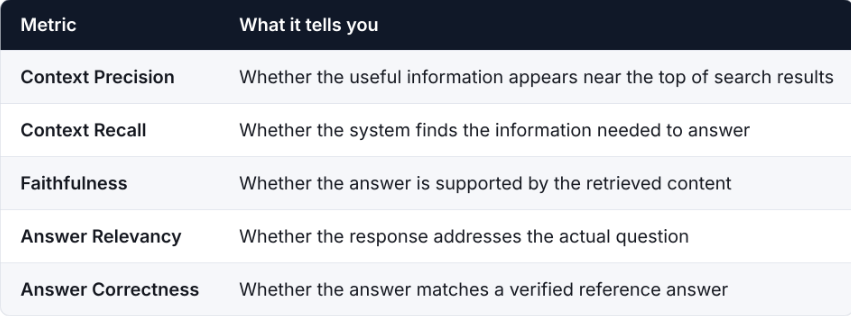
A practical way to test your chatbot
Collect questions that users are likely to ask.
Prepare correct answers and identify the documents that support them.
Check whether the search system retrieves those documents.
Compare the chatbot's answers with the verified answers.
Ask questions the knowledge base cannot answer, and check whether the chatbot admits the information is unavailable.
Review citations, access permissions, and error handling.
Repeat the tests whenever important documents, models, or retrieval settings change.
For sensitive business workflows, involve subject-matter experts. Their review can catch mistakes that automated scores may miss.
A strong evaluation score is useful, but it should not replace professional judgment in legal, financial, or compliance-related decisions.
How Has Vyntics Used RAG in a Real Business Project?
Vyntics developed an AI-Powered Compliance Research Assistant for a confidential client in higher education.
The financial-aid teams involved worked with regulations, government handbooks, official announcements, and audit reports. Finding the right guidance often meant searching through several documents to answer a single question.
The team needed a more organized way to find relevant information and verify where each answer came from.
What did Vyntics build?
Vyntics built a RAG assistant that lets staff ask questions in plain language.
Instead of a simple chatbot reply, it provides a structured answer: a short summary, a detailed explanation, practical next steps, and links to the original documents.
Key parts of the solution:
Retrieval before answering: The assistant searches the approved collection of regulations and guidance before generating a response.
Hybrid search: Keyword and meaning-based search work together to find useful passages, even when the question uses different wording.
Source prioritization: The system weighs the authority and recency of information when selecting relevant material.
Verified citations: Answers link back to the supporting documents and sections.
A fallback when information is missing: If the system cannot find enough evidence, it says so instead of making an unsupported guess.
Regular source updates: An automated weekly process collects and processes changes from supported sources.
The project uses AWS Batch and Fargate, Amazon S3, Pinecone, Supabase/PostgreSQL, FastAPI, and OpenAI.
What were the results?
The published Vyntics case study reports that the assistant works across more than 20,000 source documents, with 95%+ correct answers and verified citations on every answer.
These figures describe this specific project. They should not be treated as guaranteed results for every RAG chatbot.
The case study also notes an important limitation: the knowledge base refreshes weekly, so newly published guidance may not appear immediately.
The assistant supports research and professional review. It does not make final compliance decisions or replace qualified professionals.
You can read more in the Vyntics Compliance RAG Chatbot case study.
How Can You Keep RAG Chatbot Costs Under Control?
You don't need to build every feature from day one. A better approach is to start with one clear business need and expand the system as its value becomes clear.
Here are a few ways to avoid unnecessary development costs:
Choose a specific use case. Start with one workflow that takes time or causes problems for your team. Avoid trying to automate every department at once.
Review your documents first. Remove duplicate files and organize the information before building the ingestion process. Good data quality and governance make later development easier.
Build only what you need. Choose infrastructure based on your current workload rather than paying for features you may never use.
Compare AI models. Test different models for answer quality, response time, and cost before choosing one.
Improve search before changing models. If the chatbot retrieves the wrong information, upgrading the language model may not fix the problem.
Track usage. Monitor API consumption, hosting, storage, and failed requests.
Include maintenance in the budget. Document updates, security checks, and regular evaluation should be part of the plan.
Starting with a focused pilot helps your team understand the real requirements. It also makes it easier to plan the next stage based on what the system actually delivers.
How Can Vyntics Help With Your RAG Chatbot Project?
Every business has different documents, workflows, and security requirements. The right solution should reflect those needs instead of following a one-size-fits-all approach.
Vyntics builds custom RAG systems and knowledge assistants, covering document processing, hybrid search, citations, evaluation, integrations, and deployment.
Explore our RAG & Knowledge Assistants service to learn more. You may also be interested in our AI Agents and Data Pipelines & Integration services, and other Vyntics case studies.
Considering a RAG chatbot for your organization? Book a strategy call with Vyntics. We'll discuss your documents, business requirements, and budget before development begins.
Frequently Asked Questions
How much does a RAG chatbot cost?
Rough planning estimates only - not actual costs or Vyntics quotations.
A RAG chatbot has two kinds of cost: a one-time development cost and a monthly running cost. Development cost depends on your scope, including the volume and quality of your documents, integrations, security requirements, and accuracy targets, so it is best estimated after reviewing your needs. Running costs in this guide's examples are roughly $160 - $950 per month for a small deployment and $800 - $3,150 for a mid-sized one, covering AI usage, hosting, storage, and monitoring.
What is the monthly cost of running a RAG chatbot?
Rough planning estimates only - not actual costs or Vyntics quotations.
Under the estimates in this guide, a small deployment may need around $160 - $950 per month, and a mid-sized deployment around $800 - $3,150, excluding development and maintenance. Higher usage and enterprise infrastructure can increase these costs.
How long does it take to build a RAG chatbot?
A focused pilot may take a few weeks. A production system with integrations, security controls, and proper testing can take a few months. The condition of your documents and the number of integrations affect the timeline.
Is RAG cheaper than fine-tuning an AI model?
For information that changes regularly, RAG is often easier to maintain. Businesses can update their document collection without retraining the model. Fine-tuning is more useful for changing a model's behavior, style, or output format.
Does a RAG chatbot need its own trained AI model?
No. A RAG chatbot can use an existing language model. It retrieves relevant information from a separate knowledge base before generating an answer, so training a new model usually isn't necessary.
How is the cost of a single chatbot query calculated?
The cost generally includes the tokens sent to the model, the tokens in its response, and any embedding or retrieval expenses. The model you choose and the amount of document context retrieved affect the final cost.
Can a RAG chatbot run on a private cloud or on-premises?
Yes. A RAG system can be deployed in a private cloud or on-premises environment. This gives more control over infrastructure and data, but hardware, security, and maintenance may increase the overall cost.
What makes RAG chatbot development more expensive?
Poor-quality documents, OCR requirements, complex integrations, access controls, testing, and private deployment can all raise development costs. Ongoing maintenance also affects the total investment.
How do you measure the accuracy of a RAG chatbot?
Test whether the system retrieves the right documents and produces answers supported by them. Metrics such as faithfulness, answer correctness, and context precision are useful. Human review should also be part of the evaluation process.
Can a RAG chatbot be used for compliance research?
Yes, as long as the system uses approved sources, appropriate access controls, verified citations, and regular source updates. It should help professionals research information, not replace their final decisions.
Further Reading
Vyntics - RAG & Knowledge Assistants
Vyntics - Compliance RAG Chatbot Case Study
The cost of a RAG chatbot is only one part of the decision. Businesses should also consider how well it finds information, how reliably it answers questions, and how much work it needs after launch.
A smaller solution that solves a clearly defined problem well can be a better starting point than a large system with features your business doesn't need yet.